
快速解答 – 更新于 2026 年
What is an IRAS document identification number?
An IRAS Document Identification Number (DIN) is a unique alphanumeric reference number issued by the Inland Revenue Authority of Singapore (IRAS) to identify a specific tax return document or official notice for a particular Year of Assessment (YA).
关键精华
- A DIN relates to a tax return document and assessment year, while a UEN identifies the business entity.
- Use IRAS’s official Form C-S/C DIN lookup with the correct Year of Assessment and tax reference number.
- The lookup displays a DIN only where the relevant return is outstanding, with current-year availability beginning in May.
- An empty result needs a filing-status check; retain the filing acknowledgement if the return has already been submitted.
- Keep Corppass access, tax records and responsibility for submission organised alongside the DIN.
An IRAS Document Identification Number, or DIN, identifies an 所得税申报表 document. For company tax administration, it is associated with the return for the relevant Year of Assessment, not the company’s permanent business identifier.
If you have been asked for a DIN, identify the company and assessment year involved. IRAS provides a dedicated public lookup for Form C-S/C. This guide explains how to use it and how to resolve the common reasons a number is not displayed.
What is an IRAS DIN?
The number helps identify the 退税 document being discussed or handled. It is useful when working with an issued return or resolving a query referring to that document.
A company should record the DIN together with its legal name, UEN or tax reference number, and Year of Assessment. Saving a number without its assessment year can be confusing when an accountant reviews several returns.
DIN, UEN, and Tax Reference Number: What is the Difference?
| Identifier or Reference | What it Relates to | Where it Belongs in Your Records |
|---|---|---|
| DIN | The particular tax return document | Alongside the return and its Year of Assessment (YA) |
| 联合会 | The registered business or entity | Corporate registration and government transaction records |
| Company Tax Reference Number | The taxpayer in IRAS’ system | Tax correspondence and tax reference field in a service |
| Filing Acknowledgment | Confirmation of a submitted transaction | With the submitted return and supporting tax computation |
Companies in Singapore commonly use their 联合会 as their tax reference. Use the reference shown in the company’s IRAS records, especially if dealing with an older entity or a record using a different identifier. InCorp’s UEN指南 explains the business identifier in more detail.
Where Can You Find Your Company’s DIN?
Start with the return document or relevant correspondence you have been asked to refer to. If you need the Form C-S/C DIN, open the official View Document Identification Number service on myTax Portal.
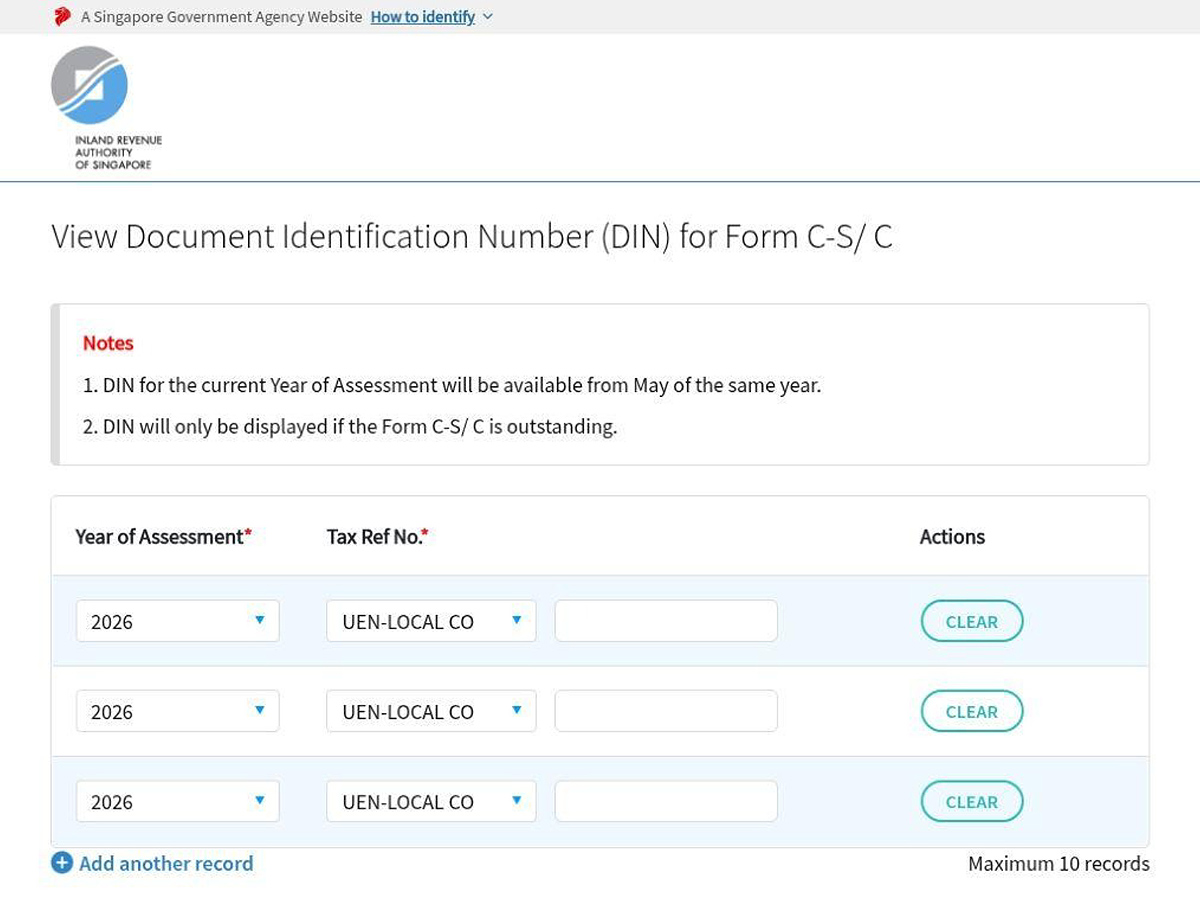
The service asks for the YA and Tax Ref No. Its published notes say current-year DINs become available from May and are displayed only when the Form C-S/C remains outstanding.
Therefore, you need to interpret the result in the context of 备案状态. Retrieving a reference and submitting a return are 分开 actions in the tax workflow.
How to Retrieve a DIN Through IRAS
Step 1: Prepare the Correct Company Reference
Take the tax reference from an IRAS record for the entity concerned. Check that you are not using a director’s personal tax identifier, another group company’s UEN, or a GST registration number copied from an unrelated invoice.
Step 2: Select the Year of Assessment (YA)
Choose the assessment year requested in the correspondence or filing task. Do not select a year merely because it matches the current calendar year. Match it to the company’s tax records and relevant financial period.
Step 3: Enter the Reference and Run the Lookup
Select the Tax Reference Type that matches the entity, then enter its Tax Ref No. Complete any on-screen verification and submit the lookup. Check the characters before searching, especially when copying from a scan.
Step 4: Save the Result With its Context
If a DIN is displayed, retain it with the company name, tax reference, and YA. Store the result in the same tax-year folder as the return and correspondence, rather than in an isolated spreadsheet column with no description.
Step 5: Check the Return Status and Next Action
The person responsible for corporate income tax should verify whether a return is outstanding, being prepared, or already filed. Where filing remains due, complete the return through the relevant authorised myTax Portal service and save its acknowledgement.
Why is No DIN Displayed?
| 情况 | 检查什么 | 建议步骤 |
|---|---|---|
| Current Year Lookup Too Early | The lookup’s published availability period | Return when the service makes the current-year DIN available |
| Return Has Already Been Filed | Submission history and acknowledgement | Retrieve the filed return or acknowledgement from the company’s tax records |
| Wrong Assessment Year | The year stated on the filing request | Repeat the lookup using the correct year |
| Incorrect Entity Reference | IRAS correspondence and company particulars | Correct the reference and check that the entity name matches |
| No Expected Outstanding Return Appears | Filing obligations, waiver status, or an IRAS instruction | Ask the authorised tax representative to review the account and contact IRAS if needed |
| Technical or Access Problem | Browser message, service availability, and the route being used | Retry the official service or contact IRAS with the error details |
If you contact IRAS, provide the company reference, assessment year, service name, and the problem encountered. Keep sensitive company records within the official communication channel.
Do You Need a DIN to Log in to myTax Portal?
Company tax access is managed through the authorised business access arrangements, including Corppass. The DIN lookup is not a replacement for authorising a staff member or tax agent to transact for the company.
Before filing, confirm who has the necessary corporate tax access and who will review the return. Where an external tax agent prepares it, agree who submits and who keeps the final acknowledgement. This avoids the common administrative gap where a return is prepared, but nobody completes submission.
How Does the DIN Fit Into Corporate Income Tax Filing?
The annual filing work starts with accounts and a tax computation. The company then determines the appropriate return: Form C-S, Form C-S (Lite) or Form C, according to IRAS’s eligibility rules.
IRAS states the YA 2026 filing deadline as 30 年 2026 月 XNUMX 日. Record the applicable assessment year and meet the required filing process. Estimated Chargeable Income is a separate filing obligation, with its own timing and waiver conditions.
InCorp 的 Singapore taxation guide provides wider context for business tax obligations. For the DIN task itself, focus on the return reference, filing status, and evidence of submission.
Get Professional Help With Tax Matters
Treat the DIN as one part of an organised corporate tax filing process. Confirm the company and Year of Assessment, use the official IRAS lookup, and retain the result alongside the return and submission acknowledgement.
If the reference is missing or unclear, check the filing records before deciding what to do next. Clear ownership of the preparation, review, and submission tasks helps keep the process on track. A professional corporate services specialist such as InCorp’s tax team can provide related tax support. 联系我们 找出方法!
FAQs about IRAS Document Identification Number
Is a DIN the same as a UEN?
- No. The UEN identifies the entity. The DIN identifies the relevant tax return document. Store both with the assessment year when managing a DIN-related query.
Where do I enter the company’s details to find the DIN?
- Use the official IRAS View Document Identification Number service linked in this guide. It asks for the Year of Assessment and Tax Ref No.
Why has a DIN disappeared after filing?
- The lookup is designed to display DINs for outstanding Form C-S/C returns. Check the submission acknowledgement and filing status rather than expecting the lookup to remain a historical record.
了解我们如何提供帮助!
关于作者